BOUTIQUE HOTEL LAS CASCADAS
Already have a reservation? Guest Portal

This SOP provides step-by-step instructions for creating, sending, and following up on quotes for potential guests. Quotes are generated through the Simple Booking System and can be sent either via email or WhatsApp.
Procedure Steps
🌐 Step 1: Access the Simple Booking System
Go to the Simple Booking backend dashboard: Booking Engine Back End.
Select Create Quote from the options.

📝 Step 2: Enter Guest Details
Input Required Information:
Full Name of the guest.
Email Address: If unavailable, enter [email protected].
Phone Number: Optional if an email is provided.
Dates of Stay: Input check-in and check-out dates.
Guest Count: Include the number of adults and children.
Child Age: If children are part of the reservation, specify their age for accurate pricing and accommodation options.

Check Room Availability: The system automatically filters availability based on entered dates and guest count, displaying only eligible room options.

Make sure to mark the check availability option to "Check proposal's availability and remove not available ones"

📨 Step 3: Send the Quote
Email Delivery:
Choose the elegant template option in the system to maintain a consistent, professional appearance.
Confirm and approve the quote to send it directly via email to the guest.


WhatsApp Delivery:
Copy the preview quote link from the generated quote page after saving.
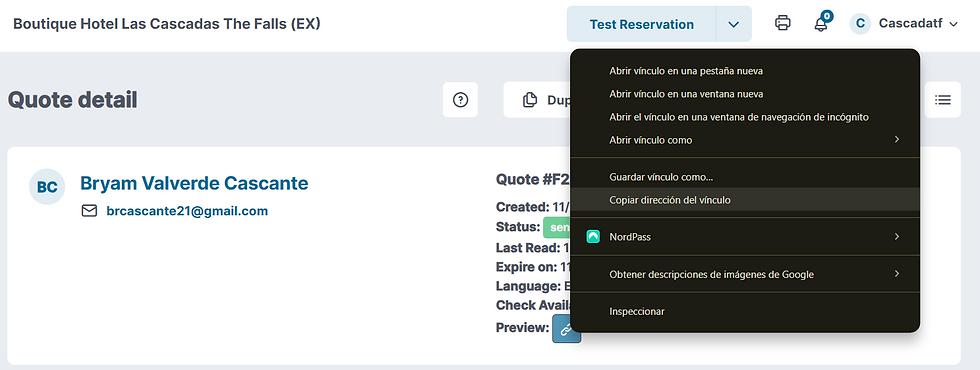
Paste the link into the guest’s WhatsApp conversation to share the quote directly.
⏰ Step 4: Follow-Up Process
Email Follow-Up: For quotes sent via email, the system handles automated follow-up messages, so no further action is needed.
WhatsApp Follow-Up:
After sending the quote through WhatsApp, set a reminder to follow up 3 days later if no response has been received.
Politely inquire if they have any questions or need assistance with the booking.
Important Notes
Automatic Booking and Availability Update: Once a guest accepts and books from the quote link, the system automatically marks the quote as booked and updates room availability accordingly.
Reference Material
Direct Reservation Creation for reference when creating quotes directly.
Oct 31, 2024